

Testing in the Sandbox Environment
Sandbox Testing
Testing AeroPass in the Sandbox with AeroStub (Bypass OTP)
Testing the AeroPass network flow in Sandbox normally requires a real one-time passcode (OTP). AeroStub lets you skip that by accepting a set of static OTP codes, so you can run the full flow without a real phone or code.
AeroStub applies to the AeroPass network flow only. You must launch the widget with an
aeroPassUserUuid.
Before you start
| You need | What it is |
|---|---|
| AeroStub enabled | One-time setup by the Aerosync team. See Prerequisite — Ask Aerosync to enable AeroStub. |
configurationId | The unique ID assigned to you that applies your widget customizations. |
aeroPassUserUuid | Identifies the AeroPass user. This is required for the AeroPass network flow. |
Prerequisite — Ask Aerosync to enable AeroStub
Raise a support request to the Aerosync team to enable AeroStub for your configurationId.
AeroStub is available in lower environments only and is never enabled in production, so it is safe to leave on for testing. You only need to request this setup once.
Running the flow
- Launch the AeroSync widget in Sandbox with your
configurationIdandaeroPassUserUuid. - Click Continue.
- On the passcode screen, enter one of the static OTP codes below:
- Enter
0000to test the happy path. - Enter an error code to test a failure state.
- Enter
Static OTP codes
| Code | Result |
|---|---|
0000 | ✅ Success — authentication passes, and the flow continues. |
0001 | ❌ Code expired. Returns OTP_EXPIRED. |
0002 | ❌ Too many attempts. Returns TOO_MANY_ATTEMPTS. |
0003 | ❌ Account not found. Returns ACCOUNT_NOT_FOUND. |
0004 | ❌ Server error. Returns SERVER_ERROR. |
| Any other code | ❌ Invalid code. Returns INVALID_OTP. |
Testing the Widget with Aerosync Test Banks
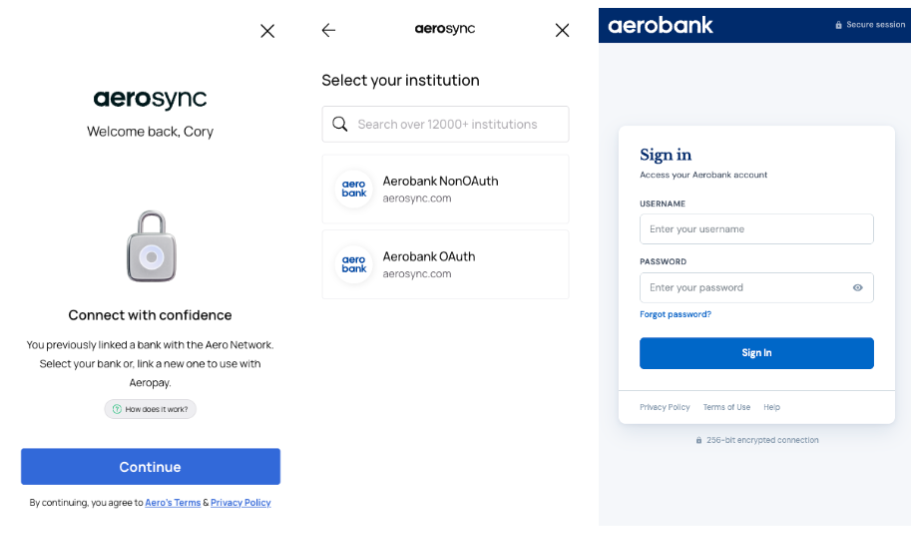
The production environment contains thousands of banks that a user can connect with, but in the sandbox environment we provide an Aerosync-branded test bank called, "Aerobank" to develop and test against.
Testing TipTest institutions named
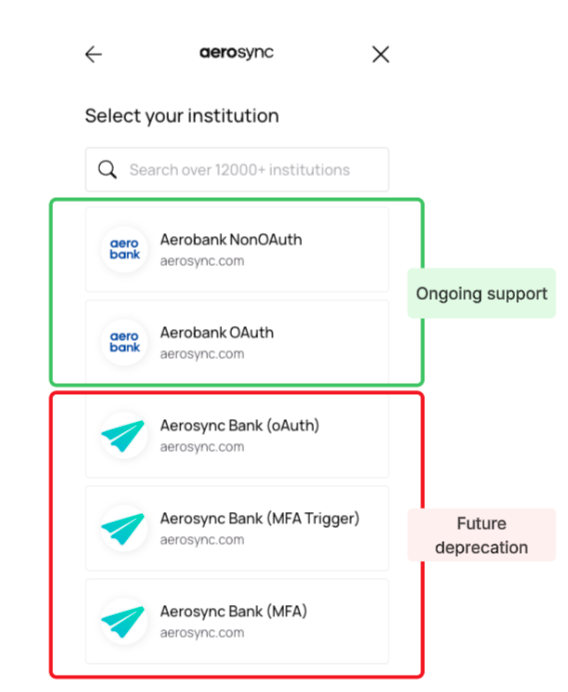
Aerosync Bankin the sandbox environment are scheduled for deprecation. Although we currently allow connection, Aerosync Bank is no longer designed or supported for sandbox integration testing.To ensure continuous and reliable sandbox testing, all integrations must connect to
Aerobank
Aerobank Login Credentials
When prompted to log in to AeroBank, use one of the following username/password combinations depending on the scenario you want to test:
Aerobank
This represents the non-oauth flow.
Log in and simulate a successful login, MFA, or incorrect credentials.
| Username | Password | Behavior |
|---|---|---|
sync | no_mfa | Login succeeds immediately — no MFA step |
sync | mfa | Login succeeds, then MFA is required before the account connects |
sync | any other string value | Returns incorrect credentials error, prompts user to try entering credentials again |
Aerobank - MFA Scenario
When you log in with sync / mfa, the flow will pause and ask a security question:
"What city were you born in?"
| Answer | Behavior |
|---|---|
correct | MFA passes — account connects successfully |
| any other string value | MFA fails — connection is rejected |
Aerobank OAuth
Simulates an OAuth flow.
App-to-app testing only: the AeroBank test app installed:
Testing the app-to-app (app2app) flow? You'll also need the AeroBank test app installed on your device:
Android: Download from Firebase App Distribution
iOS: Reach out to the support team and we'll send you a TestFlight invite.
| Username | Password | Behavior |
|---|---|---|
| sync | no_mfa | Login successful - continues to consent and account selection screens |
| sync | any other string value | Returns incorrect credentials error, prompts user to try entering credentials again |
Triggering Error States
Wrong Password at Login
Enter any username/password combination that is not one of the valid pairs above (e.g., sync / wrongpassword, or baduser / no_mfa). The login will be rejected with an invalid credentials error.
Wrong MFA Answer
After logging in with sync / mfa, enter anything other than correct when answering the security question. The MFA step will fail and the connection will be denied.
Testing the API with Aerosync Test Banks
All test users are pre-populated with the following profile data:
| Field | Value |
|---|---|
| Name | Name provided in POST /user call |
| Email provided in POST /user call | |
| Phone | Phone number provided in POST /user call |
| Address | Dynamic |
Account Balances
Each linked connection includes two accounts — Aero Checking and Aviator Savings — both with randomly generated balances. Expect different values every time a new connection is created.
| Field | Range |
|---|---|
| Available balance | $1,000.00 – $10,000.00 |
| Current balance | Available + $10.00 – $500.00 |
| Currency | USD |
Balances are also refreshed slightly each time a balance refresh is requested (a random delta of up to $500 is added or subtracted), so values will shift between aggregation runs.
Transaction History
Each account is seeded with up to 2 years of historical transactions, and new transactions are added daily. Transactions are not real — amounts, merchants, and categories are randomly generated.
Volume
- 5–10 transactions per day, spread throughout the morning
- 2 payroll credits on the 1st and 15th of each month — $3,250.00 each, labeled "Direct Deposit Payroll"
Mix
- ~85% debits, ~15% credits
Debit categories include: groceries, restaurants, gas, utilities, healthcare, shopping, entertainment, travel, and personal care.
Credit categories include: refunds, cashback, bank transfers, dividends, interest, and bonuses.
Amount Ranges
Amounts vary by category. A few examples:
| Category | Range |
|---|---|
| Coffee | $3.50 – $14.00 |
| Groceries | $15.00 – $180.00 |
| Flights | $150.00 – $350.00 |
| Payroll | $3,250.00 (fixed) |
| Bonus | $200.00 – $1,500.00 |
Testing Manual Bank Verification
If you have manual bank verification enabled on your configurationId, you can test the following cases:
| Routing Number | Account Number | Expected Result |
|---|---|---|
| 999999992 | 1000000011 | Verified |
| 999999992 | 1000000051 | AC-152 | We were unable to verify this account information. Please double-check your account and routing numbers and try again. |
| 999999992 | 1000000013 | AC-153 | The name on the account doesn't match the information provided. Please verify that you've entered your name exactly as it appears on your bank account. |
| 999999992 | 1000000073 | AC-154 | We couldn't verify this account. Please check that your account and routing numbers are correct. |
| 999999992 | Any other number | AC-117 | Could not validate account |
Updated 17 days ago